Why Every Digital Nomad in Southeast Asia Needs a VPN in 2026 (And Which One to Get)
You're sitting in a Chiang Mai café, logging into your bank account, sending client invoices, and checking your crypto portfolio — all on a WiFi network shared with 40 strangers. Every byte of data between your laptop and the internet is passing through infrastructure you don't control, in a country that actively monitors online traffic.
This isn't a scare tactic. It's the daily reality for hundreds of thousands of remote workers across Southeast Asia. A VPN (Virtual Private Network) is the single most important tool in your digital nomad toolkit — more essential than a good coworking space, more critical than a local SIM card.
This guide covers exactly why you need one, what to look for, how VPN legality works across the region, and which service actually delivers for nomads in SEA.
What Is a VPN and How Does It Work?
A VPN creates an encrypted tunnel between your device and a server operated by the VPN provider. All your internet traffic passes through this tunnel, meaning anyone on the same WiFi network — or your Internet Service Provider — sees only encrypted gibberish instead of your actual browsing activity.
The VPN server also replaces your real IP address with its own. Connect to a US server, and every website sees a US IP address. Connect to a Singapore server, and you appear to be in Singapore. This has practical benefits beyond privacy — it lets you access your home banking, streaming libraries, and services that would otherwise be geo-blocked.
Think of it as a private, sealed postal service. Without a VPN, you're sending postcards — anyone handling them can read the contents. With a VPN, you're sending locked packages that only you and the recipient can open.
4 Real Reasons Nomads in SEA Need a VPN
This isn't about theoretical privacy concerns. These are concrete problems you'll hit within your first week of working remotely in Southeast Asia.
1. Public WiFi Is Fundamentally Insecure
Coworking spaces, cafés, hotel lobbies, airports, and malls across Southeast Asia use shared WiFi networks. Even password-protected networks are vulnerable — every connected device shares the same encryption key. Techniques like man-in-the-middle attacks, packet sniffing, and session hijacking are straightforward on these networks, even for amateur hackers.
The scale of the problem is real. Thailand's National Cyber Security Agency (NCSA) reported over 1,000 cyber incidents in just the first five months of 2025, with 63% of organizations surveyed reporting data breaches. Vietnam and Indonesia have seen similar spikes in cybercrime targeting foreign residents.
Every time you check your bank balance, send a client proposal, or enter a password on café WiFi without a VPN — that data is potentially exposed.
2. Banking Apps Get Geo-Blocked
Many US, UK, and Australian banks flag or block logins from Southeast Asian IP addresses. You'll encounter security lockouts, forced password resets, SMS verification loops, or outright account freezes. This is especially common with Charles Schwab, Chase, Barclays, HSBC, and several Australian banks.
A VPN lets you connect through a server in your home country, so your bank sees a familiar IP address. No lockouts, no security alerts, no frantic international calls to customer service at 3am local time.
3. Internet Censorship Is Real and Active
Thailand and Vietnam actively block websites and monitor internet traffic. This isn't limited to extreme content — news outlets, social media, and informational websites get caught in the net:
| Country | Censorship Level | What's Blocked or Restricted | VPN Legal? |
|---|---|---|---|
| 🇹🇭 Thailand | High | News sites (BBC, Daily Mail), gambling, content critical of the monarchy — 2,600+ URLs blocked in a single 6-month period | ✅ Yes |
| 🇻🇳 Vietnam | Medium-High | Political content, some social media intermittently, foreign news outlets, ISPs required to store data for authorities | ✅ Yes (regulated) |
| 🇮🇩 Indonesia | Medium | Gambling, adult content, Reddit (intermittent), some LGBTQ+ content, Telegram (periodic) | ✅ Yes |
| 🇲🇾 Malaysia | Low-Medium | Gambling, some political content — generally the most open internet in the region | ✅ Yes |
Key takeaway: VPNs are legal in all four major SEA nomad destinations. Using one is standard practice among expats and digital workers across the region.
4. Streaming and Content Access
Your Netflix library changes the moment you land. Spotify, Hulu, BBC iPlayer, and many podcast platforms are either unavailable or serve different content catalogs in Southeast Asia. Sports streaming is particularly affected — NBA League Pass, NFL Game Pass, and Premier League coverage all vary by region.
A VPN lets you connect through your home country and access the content library you're already paying for.
What Makes a Good VPN for Southeast Asia?
Not all VPNs work equally well in this region. The requirements for a nomad bouncing between Thai cafés and Vietnamese coworking spaces are different from someone in London wanting to watch US Netflix. Here's what to prioritize:
🔵 Servers in SEA countries — Nearby servers mean faster speeds. A VPN with only US and European servers will be painfully slow from Bangkok or Saigon.
🔵 Obfuscation technology — Some Thai and Vietnamese networks detect and throttle or block VPN traffic. Obfuscated servers disguise VPN connections as regular HTTPS browsing, bypassing detection.
🔵 Speed — SEA internet is often slower than Western countries to begin with. Your VPN shouldn't cut speeds by more than 10-15%. Look for providers using modern protocols like WireGuard.
🔵 Kill switch — If your VPN connection drops momentarily, a kill switch instantly cuts your internet to prevent data leaking through the unprotected connection. Non-negotiable when banking.
🔵 No-logs policy (independently audited) — The VPN provider should not store records of your activity. Look for audits by firms like Deloitte or PricewaterhouseCoopers — not just a marketing claim on their website.
🔵 Multiple device support — Laptop, phone, tablet — you need simultaneous connections without paying extra per device.
🔵 30-day money-back guarantee — You should be able to test the service in your actual location before committing long-term.
Our Top Pick: NordVPN

After evaluating VPN performance, speed, security features, and reliability across Thailand, Vietnam, Indonesia, and Malaysia, NordVPN consistently comes out as the strongest option for digital nomads in the region. Here's the full breakdown:
| Feature | NordVPN Details |
|---|---|
| Total Servers | 6,000+ across 111 countries |
| SEA Server Locations | Thailand, Vietnam, Malaysia, Indonesia, Singapore, Cambodia, Laos, Myanmar |
| Average Speed | ~168 Mbps (5-10% loss on nearby servers) |
| Simultaneous Devices | 10 |
| Obfuscation | ✅ Obfuscated servers for restricted networks |
| Kill Switch | ✅ All platforms (Windows, Mac, iOS, Android, Linux) |
| No-Logs Policy | ✅ Independently audited by Deloitte |
| Server Type | RAM-only (all data wiped on every reboot) |
| Threat Protection | ✅ Built-in ad, malware & tracker blocker |
| Protocol | NordLynx (WireGuard-based — faster than OpenVPN) |
| Price (2-year plan) | ~$3.39/month (up to 68% off) |
| Money-Back Guarantee | 30 days, no questions asked |
Why NordVPN Stands Out for SEA Nomads
Virtual Thai Servers = Better Privacy. NordVPN uses virtual server locations for Thailand — your traffic gets a Thai IP address, but the physical hardware is in a privacy-friendly jurisdiction outside Thailand. This means the server cannot be seized or tampered with by local authorities, while you still get the speed benefits of a nearby connection point.
Threat Protection Pro. Beyond encryption, NordVPN's built-in Threat Protection blocks malicious websites, ads, and trackers at the DNS level. In independent testing, it blocked 79% of malware-hosting sites and 87% of phishing attempts. This is particularly valuable in SEA where phishing attacks targeting foreigners — fake bank notifications, fake visa renewal emails — are extremely common.
NordLynx Protocol = Real Speed. NordVPN's proprietary protocol built on WireGuard delivers significantly faster connections than traditional OpenVPN. In real-world testing from Thailand, speeds averaged 168 Mbps with only 5-10% loss on nearby servers. That's fast enough for video calls, large file uploads, and 4K streaming simultaneously — you won't feel the VPN is there.
🔒 Get NordVPN — Up to 68% Off
Encrypt your connection, access your home banking, and browse without censorship from anywhere in Southeast Asia. 10 devices, 30-day money-back guarantee.
VPN Legality: Country-by-Country Guide
One of the most common concerns for nomads new to SEA: is using a VPN going to get me in trouble? Short answer — no. Here's the detailed breakdown:
🇹🇭 Thailand
VPN Status: Legal. VPNs are widely used by expats, tourists, and Thai professionals. The Computer Crime Act does not prohibit VPN technology itself. However, using any tool (VPN or otherwise) to commit illegal acts remains illegal — the technology isn't the issue, the activity is. Thousands of foreigners use VPNs daily in Thailand without any issues.
🇻🇳 Vietnam
VPN Status: Legal but regulated. Vietnam's 2019 Cybersecurity Law requires ISPs to store user data and provide it to authorities on request. VPNs are not banned for personal use — the large expat community uses them routinely for banking, streaming, and work. However, Vietnam has signaled potential new regulations could come in late 2026, so this is worth monitoring.
🇮🇩 Indonesia (Bali)
VPN Status: Legal. Very widely used across the country. Indonesia blocks certain categories of websites but does not restrict VPN usage. No enforcement against individual users has been reported.
🇲🇾 Malaysia
VPN Status: Legal. No restrictions on personal use. Malaysia has the most open internet environment in the region for nomads.
How to Set Up a VPN in 5 Minutes
If you've never used a VPN before, the setup is genuinely simple:
🔵 Step 1: Choose your plan. The 2-year plan is the best value at ~$3.39/month. You're covered by a 30-day money-back guarantee either way.
🔵 Step 2: Download the app for your devices — Windows, Mac, iOS, or Android. Installation takes under a minute on each device.
🔵 Step 3: Open the app and configure these settings:
- Kill Switch → ON
- Threat Protection → ON
- Protocol → NordLynx (best speed)
- Auto-connect on WiFi → ON
🔵 Step 4: Connect to a server. For banking → choose your home country (US, UK, Australia). For general browsing and best speed → choose the nearest SEA server (Singapore or your current country).
🔵 Step 5: Leave it running. With auto-connect enabled, NordVPN activates every time you join a WiFi network. You'll forget it's there — which is exactly the point.
Complete Your Security: Password Management
A VPN encrypts your connection — but if your passwords are weak, you're still vulnerable. Managing logins across multiple bank accounts, crypto exchanges, freelance platforms, email accounts, and client portals across different countries gets complicated fast. Reusing passwords or storing them in your browser is a serious risk, especially on shared networks.
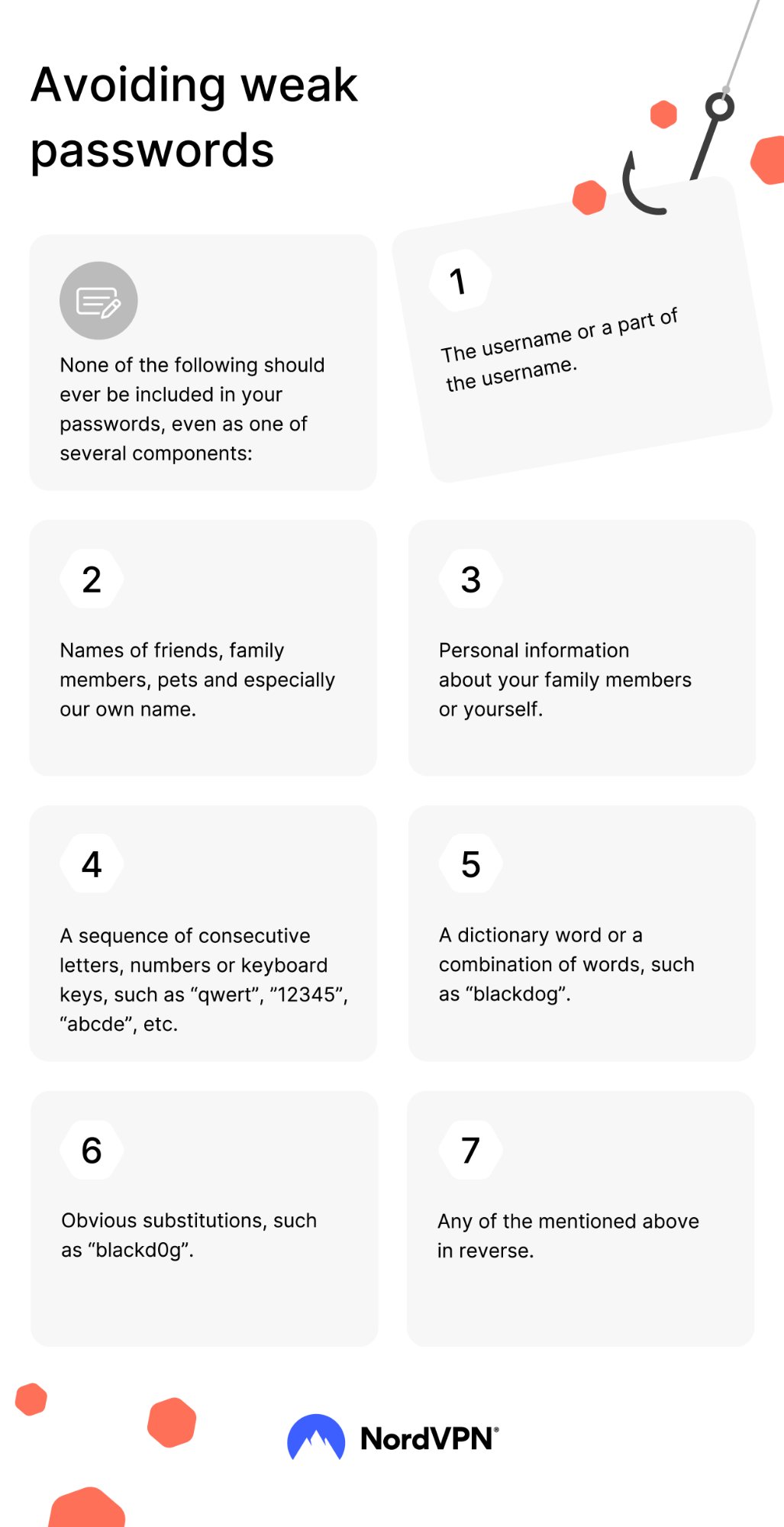
Source: NordVPN — Avoiding Weak Passwords
The infographic above illustrates why most people's passwords are far weaker than they think. If any of your passwords contain your name, pet's name, birthday, keyboard patterns like "qwerty" or "12345", or dictionary words — they can be cracked in seconds by modern tools.
NordPass is a password manager from the same team behind NordVPN. One master password unlocks all your credentials across devices, with auto-fill, encrypted storage, and cross-device syncing. It generates unique, complex passwords for every account so you never have to remember (or reuse) them.
Together, a VPN + password manager cover the two biggest digital security needs for any remote worker abroad: encrypted connections and secure credentials.
🔐 Secure Your Entire Digital Life Abroad
Two tools every digital nomad should set up before their first day of remote work:
🔒 NordVPN — Encrypt your connection, access your home banking, bypass censorship.
🔑 NordPass — One master password for everything. Auto-fill across all your devices.
Common VPN Questions for Nomads
Will a VPN slow down my internet?
With a modern protocol like NordLynx, expect only 5-10% speed loss on nearby servers. On a typical 100 Mbps coworking connection, you'll get ~90 Mbps — more than enough for video calls, streaming, and file uploads simultaneously. You shouldn't notice any difference in day-to-day use.
Will my bank know I'm using a VPN?
No. When connected to a US server, your bank sees a US IP address. As far as their systems are concerned, you're browsing from home. This actually prevents the security flags that would trigger if they detected a Thai or Vietnamese IP address on your account.
What if a VPN gets blocked at a café or coworking space?
Some networks block standard VPN protocols. Switch to obfuscated servers — these disguise VPN traffic as regular HTTPS browsing, bypassing network-level blocks. In NordVPN, enable "Obfuscated Servers" in the settings and reconnect.
Should I leave my VPN on all the time?
Yes. Enable auto-connect in your VPN settings so it activates whenever you join any WiFi network. The speed impact is negligible, and the protection is continuous. The only time you might disconnect is if a specific local service (like a Thai government website) requires a local IP address.
Can I use one VPN account on my laptop AND phone?
Yes. NordVPN supports 10 simultaneous device connections on a single account. Install it on your laptop, phone, and tablet — all protected at once, no extra cost.
What's the difference between a VPN and incognito mode?
Incognito/private browsing only prevents your browser from saving your local history. Your ISP, the WiFi network operator, and websites can still see everything you do. A VPN encrypts your actual internet traffic — it's a fundamentally different level of protection.